 English
 Bahasa Indonesia
 Bahasa Melayu
 Cebuano
 Dansk
Dansk Deutsch
 Español
 Français
 Italiano
 Nederlands
 Română
 Tiếng Việt
 Türkçe
 Czech
Czech Ślōnskŏ gŏdka
 Татар теле
 Ukrainian
 العربية
 Thai
Thai Portugues
 Hindi
Hindi Greek
Greek Chinese
 Japanese
 Magyar
What Is MP3 and How Does It Work?
Hey there! I’m Peter, a developer and music lover. I often see people stream music and podcasts on platforms without thinking about the audio format behind the sound. One of the most common digital audio formats is MP3. Even in a streaming world, the MP3 format still plays a major role in how audio is stored, shared, and played across devices. Many independent creators and listeners interact with MP3 files daily.
In this guide, I will explain what MP3 is and how it works in simple terms. If you are a listener, creator, or beginner learning about audio formats, this will help you understand what happens behind the scenes. My goal is to make MP3 clear and practical.
What is MP3, and why does it matter
MP3 stands for MPEG-1 Audio Layer III. I understand it as a digital audio format designed to reduce file size while keeping acceptable sound quality. It was developed by the Moving Picture Experts Group (MPEG).
From my experience working with online audio platforms, the MP3 format makes sharing and streaming easier. A three-minute song saved as an MP3 file is much smaller than the same song in uncompressed CD quality. That size reduction is important for platforms that host millions of tracks.
In simple words, I see MP3 as a smart way to shrink audio files without heavily affecting how they sound to most listeners.
In my view, MP3 made large-scale digital audio platforms possible. Without compression, hosting millions of tracks would require massive storage and bandwidth. MP3 helped reduce those limits.
Platforms like SoundCloud support independent artists, podcasters, and DJs. Compressed audio formats allow them to upload and stream content efficiently. Even as newer codecs exist, the ideas behind MP3 still shape modern streaming systems.
MP3 remains important because it balances file size, compatibility, and sound quality.
Let’s Understand the Brief History of MP3
MP3 was developed in the early 1990s to solve a major problem: digital audio files were too large. Slow internet connections made sharing music difficult. MP3 changed that by compressing sound into smaller files.
By the late 1990s and early 2000s, MP3 became the standard for online music sharing and portable media players. As streaming platforms later emerged, compressed audio formats like MP3 helped make large-scale audio hosting possible. From my perspective, services such as SoundCloud grew in a world already shaped by MP3 technology.
Technical Depth: Understanding MP3 in Detail
Key Definitions
- Bitrate: The amount of data processed per second, measured in kilobits per second (kbps).
- Sampling Rate: The number of audio samples taken per second, usually 44.1 kHz for music.
- Lossy Compression: A method that removes some audio information permanently to reduce size. I also compare lossy and lossless audio differences in another guide.
- Audio Codec: A system that compresses and decompresses digital audio.
Bitrate Comparison Table
| Bitrate (kbps) | File Size (3 min song) | Sound Quality | Best Use Case |
| 96 kbps | ~2 MB | Low | Speech content |
| 128 kbps | ~3–4 MB | Standard | Casual streaming |
| 256 kbps | ~5–6 MB | High | Music platforms |
| 320 kbps | ~7–8 MB | Very High | Enthusiast listening |
From my testing, a higher bitrate means better sound quality but a larger file size. To understand these numbers more clearly, read my explanation of what audio bitrate means.
MP3 as an Audio Codec
I always explain that MP3 is not just a file extension. It is an audio codec, meaning coder-decoder. A codec compresses digital audio for storage or transmission and then decompresses it for playback.
The MP3 format follows MPEG standards for digital audio compression. From what I have learned, this balance between size and quality is why it became widely adopted. Many streaming systems are built on similar compression principles.
How Does MP3 Work?
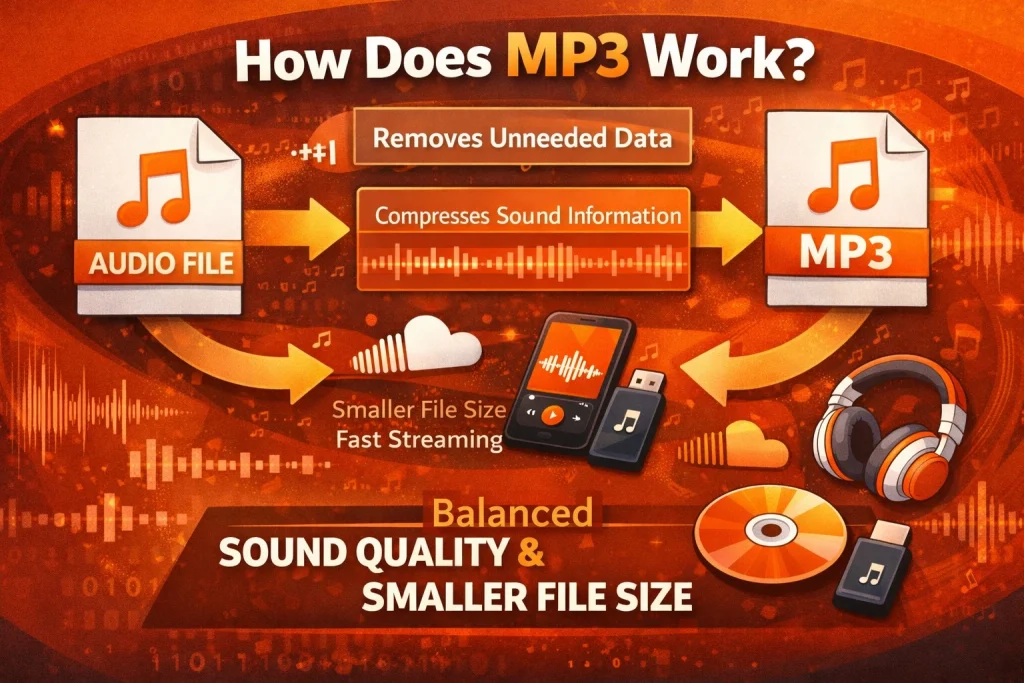
I explain MP3 as a format that uses lossy compression. This means it removes parts of the audio that most people cannot hear. The goal is to reduce file size while keeping the listening experience smooth.
The encoder uses a psychoacoustic model based on human hearing. It removes very quiet sounds and frequencies outside the normal hearing range. This process reduces data while preserving what the ear notices most.
Here is how I describe the process:
- The original sound is converted into digital data.
- The encoder analyzes audio frequencies.
- Less important sounds are removed.
- The remaining data is compressed and saved as an MP3 file.
When a listener presses play on a platform like SoundCloud, a decoder converts compressed audio data back into sound in real time.
Encoding vs Decoding Explained
From my understanding, MP3 relies on two main steps: encoding and decoding. An encoder compresses raw audio into the MP3 format. A decoder reads the MP3 file and turns it back into sound.
During encoding, some data is permanently removed to shrink the file size. The decoder does not restore the removed data. It simply reconstructs the remaining information so the listener hears clear audio.
Streaming platforms like Soundcloud use similar encoding and decoding processes to deliver smooth playback across devices. If you want a broader technical explanation, I cover this in my complete guide on audio encoding.
MP3 vs Other Audio Formats
Here is how I compare MP3 with other formats often used in streaming environments:
| Format | Compression Type | File Size | Audio Quality | Common Use |
| MP3 | Lossy | Small | Good | General listening |
| AAC | Lossy | Better at the same bitrate | Better at same bitrate | Streaming apps |
| WAV | Uncompressed | Very Large | Excellent | Studio recording |
| FLAC | Lossless | Medium-Large | Excellent | Archiving |
Many modern platforms prefer AAC for efficiency. Still, the compression logic behind MP3 remains foundational in digital audio systems.
Compression Ratio
Technically, MP3 can reduce audio size by about 75% to 90% compared to uncompressed WAV files. This high compression ratio explains why it became widely adopted in online audio services.
Expert Tips for Using MP3
I recommend choosing the right bitrate based on your needs. A bitrate of 128 kbps creates smaller files but slightly lower quality. For clearer sound, 256 kbps or 320 kbps is better.
If you are creating audio for online platforms, focus on clean source recordings before compression. Good input audio always leads to better compressed output. Understanding how MP3s work helps you make better decisions as a creator or listener.
Common Problems with MP3
Even though MP3 is practical, I know it has limits. Because it uses lossy compression, some sound detail is permanently removed. At lower bitrates, this can slightly reduce clarity.
For everyday listening on platforms like SoundCloud, most users do not notice major differences. However, audio professionals may prefer higher-quality or lossless formats when producing or mastering music. The choice depends on the purpose.
Pros and Cons of MP3
Pros:
- Small file size
- Wide compatibility
- Efficient for streaming
- Fast playback on most devices
Cons:
- Some loss of sound detail
- Not ideal for final-stage audio mastering
- Quality depends on bitrate
From my experience, MP3 works very well for casual listening and online audio sharing. To understand MP3 compression more deeply, read my explanation of how MP3 works.
My Final Thoughts
From my perspective, MP3 is a core technology behind modern digital audio. It reduces file size while keeping acceptable sound quality. Its compression system made large-scale online audio platforms possible.
Even as newer formats are used today, the principles behind MP3 still influence how audio is streamed and stored. When you understand how MP3s work, you better understand how platforms like SoundCloud deliver music and podcasts smoothly to millions of listeners.
Frequently Asked Questions (FAQs)
Is MP3 safe to use?
Yes. MP3 is a standard digital audio format. It is safe when used on trusted platforms and devices.
Is MP3 legal?
MP3 is simply an audio format. How audio content is shared or used depends on platform policies and local regulations.
Does MP3 work on mobile devices?
Yes. I have used MP3 files across smartphones, tablets, laptops, and streaming apps without issues.
Why does an MP3 file lose quality?
MP3 uses lossy compression. It removes some audio data to reduce file size, which can slightly affect clarity at lower bitrates.
What are the alternatives to MP3?
Common alternatives include AAC, WAV, and FLAC. Many streaming platforms use AAC for efficiency, while WAV and FLAC are used for higher-quality production.
What is the difference between MP3 and MP4?
MP3 is designed only for audio. MP4 is a multimedia container that can hold audio, video, and other data.
Can MP3 files contain video?
No. MP3 files are audio-only.
Why do professionals avoid MP3 for editing?
Since MP3 removes some audio data during compression, professionals often use uncompressed or lossless formats for editing and mastering.